
TABLE OF CONTENTS
Summary
The Notes Tab is the quickest way for you to give our AML Specialists clear, case-specific instructions. Add details like,
- “This case is urgent, please prioritise”
- “Client is a trust, Trust Deed has been uploaded”
- “Please only contact [Name A], please do not contact [Name B]”
- “Client has previously been verified. Please use details from Case #”
- Any changes to the case or the end-users circumstances
When you add a note, our team is notified, giving them the ability to prioritise and act more quickly.
Platform Users:
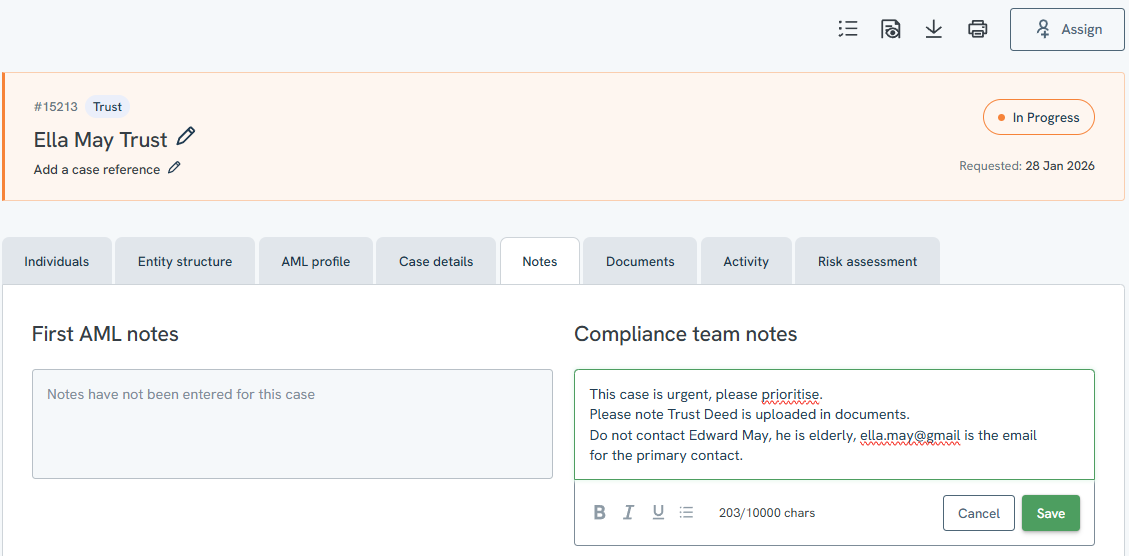
The notes tab allows you to view notes left by your team and by First AML, as well as add your own notes to a case. You can add a note by clicking the pencil icon on the right side, typing your message, then saving it. This will automatically notify the First AML team working on your case.

Agents:
The notes tab allows agents to view notes left either by themselves (prior to submitting a case) and/or notes left by their office admin.
